

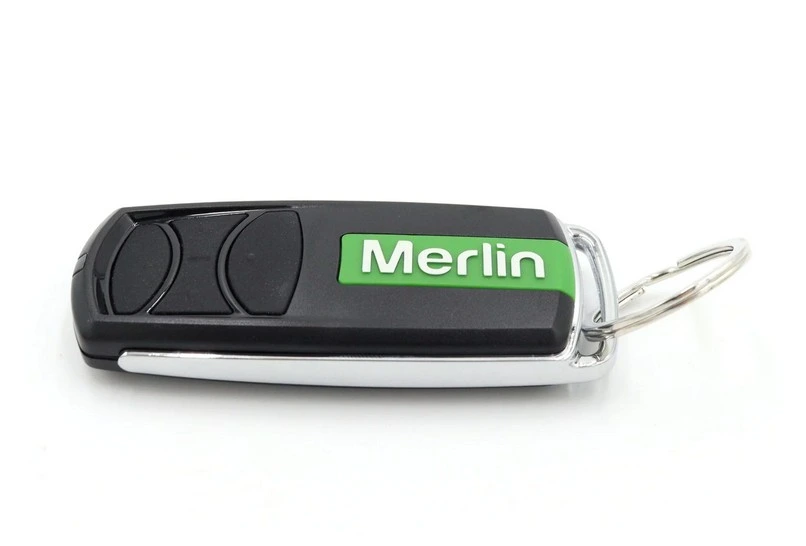


The GM830 Keyring Remote delivers dependable control of your home’s access points in a compact, convenient design.
Small and lightweight, it attaches easily to your keyring so you can operate your garage door or gate at the press of a button. Designed for reliable long-range performance, the GM830 features responsive tactile buttons and an LED indicator light, giving you clear confirmation every time you use it.
Perfect for everyday convenience, it allows you to control up to four doors or gates from one device — reducing clutter and simplifying your setup.
Enjoy smooth, reliable access whenever you arrive or leave with the E960M — a smart and practical solution for effortless home entry.
Compatible with:
Merlin garage door opener models:
Commander
Essential (MS65MYQ), Commander Elite (MS105MYQ), Commander Extreme
(MS125MYQ), SilentDrive™ Essential (MR655MYQ), SilentDrive™ Elite
(MR855MYQ), Commander Ultimate (MJ3800MYQ), Commander MyQ, WhisperDrive,
TiltMaster, PowerAce, CyclonePro, OverDrive, SilentDrive Elite MyQ,
SilentDrive BBU, SilentDrive Pro, QuietDrive Pro, WeatherDrive,
MJ3800BBU, MT800, MT600, MT1000, MT3850, MT5580P, MT60P, MT60, MT230,
RollerAce (MR60), MR600, MR800, MR1000, MJ3800, MJ3800R and all other
Merlin Security+
and Security+ 2.0 garage door openers
Merlin gate opener models:
Slide 600 (MGSK600, MGSK600-LV), Swing A 200 (MGASK, MGASK-LV, MGADK, MGADK-LV) Swing L 300 (MGLSK, MGLSK-LV, MGLDK, MGLDK-LV)
How to Program a Merlin Security+ 2.0 E960M Remote
Follow these simple steps to pair your remote with the garage door opener:
Locate the yellow “Learn” button on your garage door motor.
Press and hold any button on your new remote.
While holding the remote button, press and release the yellow Learn button (hold for about 1 second).
Release the button on your remote.
Test the remote to ensure the door operates correctly.
Your remote should now be successfully programmed.
Alternative Products
These other products might interest you